Compare commits
23 Commits
| Author | SHA1 | Date | |
|---|---|---|---|

|
dbf45196ee | ||

|
45a2aaf7b8 | ||

|
c02c62f3b1 | ||
|
|
4718674688 | ||
|
|
0e3c115368 | ||
|
|
cc506c23af | ||
|
|
1f77d94b7e | ||
|
|
5711ff27ee | ||

|
3120602d6a | ||
|
|
9f36e195bc | ||
|
|
9de7da91a7 | ||
|
|
501a15a18f | ||
|
|
6049c9e3ff | ||

|
262b402606 | ||
|
|
56ea9563b8 | ||

|
2cd6612620 | ||
|
|
5d40396fb2 | ||
|
|
93dd1eb036 | ||

|
542a46dc7c | ||
|
|
bf31b1fea0 | ||
|
|
25d4529ff9 | ||
|
|
33d7c67c04 | ||
|
|
dc8f762bac |
@@ -1,2 +1,3 @@
|
||||
**/node_modules
|
||||
api/.env
|
||||
client/dist/images
|
||||
53
CHANGELOG.md
53
CHANGELOG.md
@@ -1,5 +1,58 @@
|
||||
# # Changelog
|
||||
<details open>
|
||||
<summary><strong>2023-05-14</strong></summary>
|
||||
|
||||
**Released [v0.4.4](https://github.com/danny-avila/chatgpt-clone/releases/tag/v0.4.4):**
|
||||
|
||||
1. The Msg Clipboard was changed to a checkmark for improved user experience by @techwithanirudh in PR [#247](https://github.com/danny-avila/chatgpt-clone/pull/247).
|
||||
2. A typo in the auth.json path for accessing Google Palm was corrected by @antonme in PR [#266](https://github.com/danny-avila/chatgpt-clone/pull/266).
|
||||
3. @techwithanirudh added a Popup Menu to save sidebar space in PR [#260](https://github.com/danny-avila/chatgpt-clone/pull/260).
|
||||
4. The default pageSize in Conversation.js was increased from 12 to 14 by @danny-avila in PR [#267](https://github.com/danny-avila/chatgpt-clone/pull/267).
|
||||
5. Fonts were updated by @techwithanirudh in PR [#261](https://github.com/danny-avila/chatgpt-clone/pull/261).
|
||||
6. Font file paths in style.css were changed by @danny-avila in PR [#268](https://github.com/danny-avila/chatgpt-clone/pull/268).
|
||||
7. Code was fixed to adjust max_tokens according to model selection by @p4w4n in PR [#263](https://github.com/danny-avila/chatgpt-clone/pull/263).
|
||||
8. Various improvements were made, such as fixing react errors and adjusting the mobile view, by @danny-avila in PR [#269](https://github.com/danny-avila/chatgpt-clone/pull/269).
|
||||
|
||||
New contributors to the project include:
|
||||
|
||||
- @techwithanirudh, who made their first contribution in PR [#247](https://github.com/danny-avila/chatgpt-clone/pull/247).
|
||||
- @antonme, who made their first contribution in PR [#266](https://github.com/danny-avila/chatgpt-clone/pull/266).
|
||||
- @p4w4n, who made their first contribution in PR [#263](https://github.com/danny-avila/chatgpt-clone/pull/263).
|
||||
|
||||
The [full changelog can be found here](https://github.com/danny-avila/chatgpt-clone/compare/v0.4.3...v0.4.4)
|
||||
</details>
|
||||
<details>
|
||||
<summary><strong>2023-05-13</strong></summary>
|
||||
|
||||
**Released [v0.4.3](https://github.com/danny-avila/chatgpt-clone/releases/tag/v0.4.3) which now supports Google's PaLM 2!**
|
||||
|
||||

|
||||
|
||||
**How to Setup PaLM 2 (via Google Cloud Vertex AI API)**
|
||||
|
||||
- Enable the Vertex AI API on Google Cloud:
|
||||
- - https://console.cloud.google.com/vertex-ai
|
||||
- Create a Service Account:
|
||||
- - https://console.cloud.google.com/projectselector/iam-admin/serviceaccounts/create?walkthrough_id=iam--create-service-account#step_index=1
|
||||
- Make sure to click 'Create and Continue' to give at least the 'Vertex AI User' role.
|
||||
- Create a JSON key, rename as 'auth.json' and save it in /api/data/.
|
||||
|
||||
**Alternatively**
|
||||
|
||||
- In your ./api/.env file, set PALM_KEY as "user_provided" to allow the user to provide a Service Account key JSON from the UI.
|
||||
- They will follow the steps above except for renaming the file, simply importing the JSON when prompted.
|
||||
- The key is sent to the server but never saved except in your local storage
|
||||
|
||||
**Note:**
|
||||
|
||||
- Vertex AI does not (yet) support response streaming for text generations, so response may seem to take long when generating a lot of text.
|
||||
- Text streaming is simulated
|
||||
|
||||
|
||||
You can check the full changelog in between v0.4.2 and v0.4.3 [here](https://github.com/danny-avila/chatgpt-clone/compare/v0.4.2...v0.4.3).
|
||||
</details>
|
||||
|
||||
<details>
|
||||
<summary><strong>2023-05-11</strong></summary>
|
||||
|
||||
**Released [v0.4.2](https://github.com/danny-avila/chatgpt-clone/releases/tag/v0.4.2)**
|
||||
|
||||
32
Dockerfile
32
Dockerfile
@@ -1,38 +1,32 @@
|
||||
FROM node:19-alpine AS react-client
|
||||
# Base node image
|
||||
FROM node:19-alpine AS base
|
||||
WORKDIR /api
|
||||
COPY /api/package*.json /api/
|
||||
WORKDIR /client
|
||||
# copy package.json into the container at /client
|
||||
COPY /client/.env /client/.env
|
||||
COPY /client/package*.json /client/
|
||||
# install dependencies
|
||||
WORKDIR /
|
||||
COPY /package*.json /
|
||||
RUN npm ci
|
||||
# Copy the current directory contents into the container at /client
|
||||
|
||||
# React client build
|
||||
FROM base AS react-client
|
||||
WORKDIR /client
|
||||
COPY /client/ /client/
|
||||
# Set the memory limit for Node.js
|
||||
ENV NODE_OPTIONS="--max-old-space-size=2048"
|
||||
# Build artifacts
|
||||
RUN npm run build
|
||||
|
||||
FROM node:19-alpine AS node-api
|
||||
# Node API setup
|
||||
FROM base AS node-api
|
||||
WORKDIR /api
|
||||
# copy package.json into the container at /api
|
||||
COPY /api/package*.json /api/
|
||||
# install dependencies
|
||||
RUN npm ci
|
||||
# Copy the current directory contents into the container at /api
|
||||
COPY /api/ /api/
|
||||
# Copy the client side code
|
||||
COPY --from=react-client /client/dist /client/dist
|
||||
# Make port 3080 available to the world outside this container
|
||||
EXPOSE 3080
|
||||
# Expose the server to 0.0.0.0
|
||||
ENV HOST=0.0.0.0
|
||||
# Run the app when the container launches
|
||||
CMD ["npm", "start"]
|
||||
|
||||
# Optional: for client with nginx routing
|
||||
FROM nginx:stable-alpine AS nginx-client
|
||||
WORKDIR /usr/share/nginx/html
|
||||
COPY --from=react-client /client/dist /usr/share/nginx/html
|
||||
# Add your nginx.conf
|
||||
COPY /client/nginx.conf /etc/nginx/conf.d/default.conf
|
||||
COPY client/nginx.conf /etc/nginx/conf.d/default.conf
|
||||
ENTRYPOINT ["nginx", "-g", "daemon off;"]
|
||||
|
||||
@@ -6,10 +6,10 @@ WORKDIR /app
|
||||
# Copy package.json files for client and api
|
||||
COPY /client/package*.json /app/client/
|
||||
COPY /api/package*.json /app/api/
|
||||
COPY /package*.json /app/
|
||||
|
||||
# Install dependencies for both client and api
|
||||
RUN cd /app/client && npm ci
|
||||
RUN cd /app/api && npm ci
|
||||
RUN npm ci
|
||||
|
||||
# Copy the current directory contents into the container
|
||||
COPY /client/ /app/client/
|
||||
|
||||
68
README.md
68
README.md
@@ -40,16 +40,54 @@
|
||||
|
||||
##
|
||||
|
||||
## **Google's PaLM 2 is now supported as of [v0.4.3](https://github.com/danny-avila/chatgpt-clone/releases/tag/v0.4.3)**
|
||||
|
||||

|
||||
|
||||
<details>
|
||||
<summary><strong>How to Setup PaLM 2 (via Google Cloud Vertex AI API)</strong></summary>
|
||||
- Enable the Vertex AI API on Google Cloud:
|
||||
- - https://console.cloud.google.com/vertex-ai
|
||||
- Create a Service Account:
|
||||
- - https://console.cloud.google.com/projectselector/iam-admin/serviceaccounts/create?walkthrough_id=iam--create-service-account#step_index=1
|
||||
- Make sure to click 'Create and Continue' to give at least the 'Vertex AI User' role.
|
||||
- Create a JSON key, rename as 'auth.json' and save it in /api/data/.
|
||||
|
||||
**Alternatively**
|
||||
|
||||
- In your ./api/.env file, set PALM_KEY as "user_provided" to allow the user to provide a Service Account key JSON from the UI.
|
||||
- They will follow the steps above except for renaming the file, simply importing the JSON when prompted.
|
||||
- The key is sent to the server but never saved except in your local storage
|
||||
|
||||
**Note:**
|
||||
|
||||
- Vertex AI does not (yet) support response streaming for text generations, so response may seem to take long when generating a lot of text.
|
||||
- Text streaming is simulated
|
||||
</details>
|
||||
|
||||
---
|
||||
|
||||
<details open>
|
||||
<summary><strong>2023-05-11</strong></summary>
|
||||
|
||||
**Released [v0.4.2](https://github.com/danny-avila/chatgpt-clone/releases/tag/v0.4.2)**
|
||||
|
||||
ChatGPT-Clone received some important upgrades and improvements. A new contributor, [@qcgm1978](https://github.com/qcgm1978), makes their first contribution by adding a null check for adaptiveCards variable. Additionally, support for titling conversations with the Azure endpoint is added by [@danny-avila](https://github.com/danny-avila) in PR [#234](https://github.com/danny-avila/chatgpt-clone/pull/234). In PR [#235](https://github.com/danny-avila/chatgpt-clone/pull/235), [@danny-avila](https://github.com/danny-avila) also makes some necessary fixes to titling, quotation marks, and endpoints being unavailable with only the Azure key provided. The logging system is now powered by Pino and sanitization, thanks to [@danorlando](https://github.com/danorlando) in PR [#227](https://github.com/danny-avila/chatgpt-clone/pull/227). To bulletproof the Docker container, the .dockerignore file is updated to include the client/.env file by [@danny-avila](https://github.com/danny-avila) in PR [#241](https://github.com/danny-avila/chatgpt-clone/pull/241). This issue was brought to our attention on discord.
|
||||
<summary><strong>2023-05-14</strong></summary>
|
||||
|
||||
There is active work on the new Plugins feature, converting the frontend to Typescript, and looking to integrate Palm2, google's new generative AI accessible via API, to the project as a new endpoint.
|
||||
**Released [v0.4.4](https://github.com/danny-avila/chatgpt-clone/releases/tag/v0.4.4):**
|
||||
|
||||
You can check the full changelog in between v0.4.1 and v0.4.2 [here](https://github.com/danny-avila/chatgpt-clone/compare/v0.4.1...v0.4.2).
|
||||
1. The Msg Clipboard was changed to a checkmark for improved user experience by @techwithanirudh in PR [#247](https://github.com/danny-avila/chatgpt-clone/pull/247).
|
||||
2. A typo in the auth.json path for accessing Google Palm was corrected by @antonme in PR [#266](https://github.com/danny-avila/chatgpt-clone/pull/266).
|
||||
3. @techwithanirudh added a Popup Menu to save sidebar space in PR [#260](https://github.com/danny-avila/chatgpt-clone/pull/260).
|
||||
4. The default pageSize in Conversation.js was increased from 12 to 14 by @danny-avila in PR [#267](https://github.com/danny-avila/chatgpt-clone/pull/267).
|
||||
5. Fonts were updated by @techwithanirudh in PR [#261](https://github.com/danny-avila/chatgpt-clone/pull/261).
|
||||
6. Font file paths in style.css were changed by @danny-avila in PR [#268](https://github.com/danny-avila/chatgpt-clone/pull/268).
|
||||
7. Code was fixed to adjust max_tokens according to model selection by @p4w4n in PR [#263](https://github.com/danny-avila/chatgpt-clone/pull/263).
|
||||
8. Various improvements were made, such as fixing react errors and adjusting the mobile view, by @danny-avila in PR [#269](https://github.com/danny-avila/chatgpt-clone/pull/269).
|
||||
|
||||
New contributors to the project include:
|
||||
|
||||
- @techwithanirudh, who made their first contribution in PR [#247](https://github.com/danny-avila/chatgpt-clone/pull/247).
|
||||
- @antonme, who made their first contribution in PR [#266](https://github.com/danny-avila/chatgpt-clone/pull/266).
|
||||
- @p4w4n, who made their first contribution in PR [#263](https://github.com/danny-avila/chatgpt-clone/pull/263).
|
||||
|
||||
The [full changelog can be found here](https://github.com/danny-avila/chatgpt-clone/compare/v0.4.3...v0.4.4)
|
||||
|
||||
⚠️ **IMPORTANT :** Since V0.4.0 You should register and login with a local account (email and password) for the first time sign-up. if you use login for the first time with a social login account (eg. Google, facebook, etc.), the conversations and presets that you created before the user system was implemented will NOT be migrated to that account.
|
||||
|
||||
@@ -76,6 +114,7 @@ For discussion and suggestion you can join us: **[community discord server](http
|
||||
<summary><strong>General Information</strong></summary>
|
||||
|
||||
* [Project Origin](documents/general_info/project_origin.md)
|
||||
* [Multilingual Information](documents/general_info/multilingual_information.md)
|
||||
* [Roadmap](documents/general_info/roadmap.md)
|
||||
* [Tech Stack](documents/general_info/tech_stack.md)
|
||||
* [Changelog](CHANGELOG.md)
|
||||
@@ -101,6 +140,7 @@ For discussion and suggestion you can join us: **[community discord server](http
|
||||
* [Code of Conduct](documents/contributions/code_of_conduct.md)
|
||||
* [Contributor Guidelines](documents/contributions/contributor_guidelines.md)
|
||||
* [Documentation Guidelines](documents/contributions/documentation_guidelines.md)
|
||||
* [Code Standards and Conventions](documents/contributions/coding_conventions.md)
|
||||
* [Testing](documents/contributions/testing.md)
|
||||
* [Pull Request Template](documents/contributions/pull_request_template.md)
|
||||
* [Contributors](CONTRIBUTORS.md)
|
||||
@@ -120,8 +160,11 @@ For discussion and suggestion you can join us: **[community discord server](http
|
||||
|
||||
##
|
||||
|
||||
## Contributing
|
||||
## Star History
|
||||
|
||||
[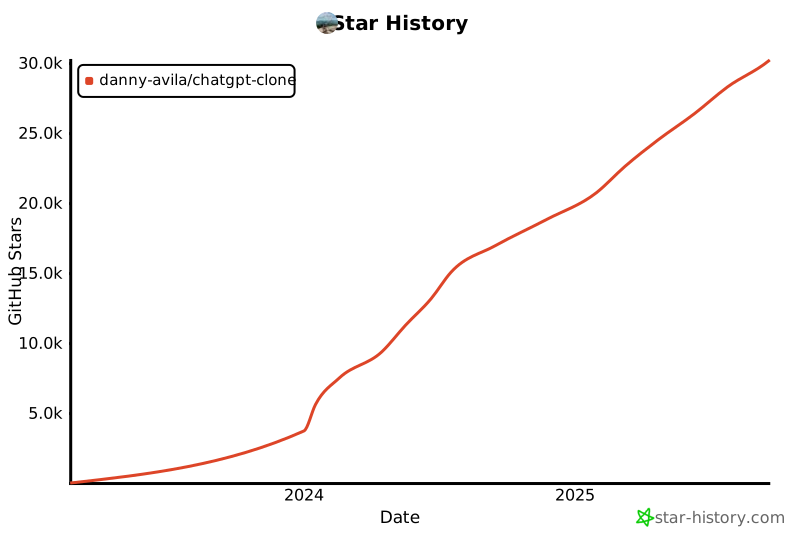](https://star-history.com/#danny-avila/chatgpt-clone&Date)
|
||||
|
||||
## Contributors
|
||||
Contributions and suggestions bug reports and fixes are welcome!
|
||||
Please read the documentation before you do!
|
||||
|
||||
@@ -129,7 +172,8 @@ For new features, components, or extensions, please open an issue and discuss be
|
||||
|
||||
- Join the [Discord community](https://discord.gg/NGaa9RPCft)
|
||||
|
||||
## License
|
||||
This project is licensed under the [MIT License](LICENSE.md).
|
||||
##
|
||||
|
||||
This project exists in its current state thanks to all the people who contribute
|
||||
---
|
||||
<a href="https://github.com/danny-avila/chatgpt-clone/graphs/contributors">
|
||||
<img src="https://contrib.rocks/image?repo=danny-avila/chatgpt-clone" />
|
||||
</a>
|
||||
|
||||
@@ -82,7 +82,10 @@ CHATGPT_TOKEN="user_provided"
|
||||
|
||||
# Identify the available models, separated by commas. The first will be default.
|
||||
# Leave it blank to use internal settings.
|
||||
CHATGPT_MODELS=text-davinci-002-render-sha,text-davinci-002-render-paid,gpt-4
|
||||
CHATGPT_MODELS=text-davinci-002-render-sha,gpt-4
|
||||
# NOTE: you can add gpt-4-plugins, gpt-4-code-interpreter, and gpt-4-browsing to the list above and use the models for these features;
|
||||
# however, the view/display portion of these features are not supported, but you can use the underlying models, which have higher token context
|
||||
# Also: text-davinci-002-render-paid is deprecated as of May 2023
|
||||
|
||||
# Reverse proxy settings for ChatGPT
|
||||
# https://github.com/waylaidwanderer/node-chatgpt-api#using-a-reverse-proxy
|
||||
|
||||
@@ -16,7 +16,7 @@ const askBing = async ({
|
||||
token,
|
||||
onProgress
|
||||
}) => {
|
||||
const { BingAIClient } = await import('og-chatgpt-api');
|
||||
const { BingAIClient } = await import('@waylaidwanderer/chatgpt-api');
|
||||
const store = {
|
||||
store: new KeyvFile({ filename: './data/cache.json' })
|
||||
};
|
||||
|
||||
@@ -11,7 +11,7 @@ const browserClient = async ({
|
||||
abortController,
|
||||
userId
|
||||
}) => {
|
||||
const { ChatGPTBrowserClient } = await import('og-chatgpt-api');
|
||||
const { ChatGPTBrowserClient } = await import('@waylaidwanderer/chatgpt-api');
|
||||
const store = {
|
||||
store: new KeyvFile({ filename: './data/cache.json' })
|
||||
};
|
||||
|
||||
@@ -23,12 +23,13 @@ const askClient = async ({
|
||||
};
|
||||
|
||||
const azure = process.env.AZURE_OPENAI_API_KEY ? true : false;
|
||||
|
||||
const maxContextTokens = model === 'gpt-4' ? 8191 : model === 'gpt-4-32k' ? 32767 : 4095; // 1 less than maximum
|
||||
const clientOptions = {
|
||||
reverseProxyUrl: process.env.OPENAI_REVERSE_PROXY || null,
|
||||
azure,
|
||||
maxContextTokens,
|
||||
modelOptions: {
|
||||
model: model,
|
||||
model,
|
||||
temperature,
|
||||
top_p,
|
||||
presence_penalty,
|
||||
@@ -37,22 +38,22 @@ const askClient = async ({
|
||||
chatGptLabel,
|
||||
promptPrefix,
|
||||
proxy: process.env.PROXY || null,
|
||||
debug: false
|
||||
// debug: true
|
||||
};
|
||||
|
||||
let apiKey = process.env.OPENAI_KEY;
|
||||
|
||||
if (azure) {
|
||||
apiKey = process.env.AZURE_OPENAI_API_KEY;
|
||||
clientOptions.reverseProxyUrl = genAzureEndpoint({
|
||||
azureOpenAIApiInstanceName: process.env.AZURE_OPENAI_API_INSTANCE_NAME,
|
||||
azureOpenAIApiDeploymentName: process.env.AZURE_OPENAI_API_DEPLOYMENT_NAME,
|
||||
clientOptions.reverseProxyUrl = genAzureEndpoint({
|
||||
azureOpenAIApiInstanceName: process.env.AZURE_OPENAI_API_INSTANCE_NAME,
|
||||
azureOpenAIApiDeploymentName: process.env.AZURE_OPENAI_API_DEPLOYMENT_NAME,
|
||||
azureOpenAIApiVersion: process.env.AZURE_OPENAI_API_VERSION
|
||||
});
|
||||
}
|
||||
|
||||
const client = new ChatGPTClient(apiKey, clientOptions, store);
|
||||
|
||||
|
||||
const options = {
|
||||
onProgress,
|
||||
abortController,
|
||||
|
||||
@@ -30,7 +30,7 @@ module.exports = {
|
||||
return { message: 'Error saving conversation' };
|
||||
}
|
||||
},
|
||||
getConvosByPage: async (user, pageNumber = 1, pageSize = 12) => {
|
||||
getConvosByPage: async (user, pageNumber = 1, pageSize = 14) => {
|
||||
try {
|
||||
const totalConvos = (await Conversation.countDocuments({ user })) || 1;
|
||||
const totalPages = Math.ceil(totalConvos / pageSize);
|
||||
@@ -45,7 +45,7 @@ module.exports = {
|
||||
return { message: 'Error getting conversations' };
|
||||
}
|
||||
},
|
||||
getConvosQueried: async (user, convoIds, pageNumber = 1, pageSize = 12) => {
|
||||
getConvosQueried: async (user, convoIds, pageNumber = 1, pageSize = 14) => {
|
||||
try {
|
||||
if (!convoIds || convoIds.length === 0) {
|
||||
return { conversations: [], pages: 1, pageNumber, pageSize };
|
||||
@@ -57,7 +57,7 @@ module.exports = {
|
||||
// will handle a syncing solution soon
|
||||
const deletedConvoIds = [];
|
||||
|
||||
convoIds.forEach((convo) =>
|
||||
convoIds.forEach(convo =>
|
||||
promises.push(
|
||||
Conversation.findOne({
|
||||
user,
|
||||
@@ -120,7 +120,7 @@ module.exports = {
|
||||
},
|
||||
deleteConvos: async (user, filter) => {
|
||||
let toRemove = await Conversation.find({ ...filter, user }).select('conversationId');
|
||||
const ids = toRemove.map((instance) => instance.conversationId);
|
||||
const ids = toRemove.map(instance => instance.conversationId);
|
||||
let deleteCount = await Conversation.deleteMany({ ...filter, user }).exec();
|
||||
deleteCount.messages = await deleteMessages({ conversationId: { $in: ids } });
|
||||
return deleteCount;
|
||||
|
||||
11325
api/package-lock.json
generated
11325
api/package-lock.json
generated
File diff suppressed because it is too large
Load Diff
@@ -1,6 +1,6 @@
|
||||
{
|
||||
"name": "chat-backend",
|
||||
"version": "0.4.3",
|
||||
"version": "0.4.5",
|
||||
"description": "",
|
||||
"main": "server/index.js",
|
||||
"scripts": {
|
||||
@@ -21,7 +21,7 @@
|
||||
"dependencies": {
|
||||
"@dqbd/tiktoken": "^1.0.2",
|
||||
"@keyv/mongo": "^2.1.8",
|
||||
"@waylaidwanderer/chatgpt-api": "github:danny-avila/node-chatgpt-api",
|
||||
"@waylaidwanderer/chatgpt-api": "^1.36.0",
|
||||
"axios": "^1.3.4",
|
||||
"bcrypt": "^5.1.0",
|
||||
"bcryptjs": "^2.4.3",
|
||||
@@ -43,7 +43,6 @@
|
||||
"meilisearch": "^0.31.1",
|
||||
"mongoose": "^6.9.0",
|
||||
"nodemailer": "^6.9.1",
|
||||
"og-chatgpt-api": "npm:@waylaidwanderer/chatgpt-api@^1.35.0",
|
||||
"openai": "^3.1.0",
|
||||
"passport": "^0.6.0",
|
||||
"passport-facebook": "^3.0.0",
|
||||
|
||||
@@ -95,7 +95,7 @@ const ask = async ({ text, endpointOption, parentMessageId = null, conversationI
|
||||
|
||||
try {
|
||||
if (!key) {
|
||||
key = require('../../data/auth.json');
|
||||
key = require('../../../data/auth.json');
|
||||
}
|
||||
} catch (e) {
|
||||
console.log("No 'auth.json' file (service account key) found in /api/data/ for PaLM models");
|
||||
|
||||
@@ -9,7 +9,7 @@ const getOpenAIModels = () => {
|
||||
};
|
||||
|
||||
const getChatGPTBrowserModels = () => {
|
||||
let models = ['text-davinci-002-render-sha', 'text-davinci-002-render-paid', 'gpt-4'];
|
||||
let models = ['text-davinci-002-render-sha', 'gpt-4'];
|
||||
if (process.env.CHATGPT_MODELS) models = String(process.env.CHATGPT_MODELS).split(',');
|
||||
|
||||
return models;
|
||||
|
||||
20260
client/package-lock.json
generated
20260
client/package-lock.json
generated
File diff suppressed because it is too large
Load Diff
@@ -1,6 +1,6 @@
|
||||
{
|
||||
"name": "chat-frontend",
|
||||
"version": "0.4.3",
|
||||
"version": "0.4.5",
|
||||
"description": "",
|
||||
"type": "module",
|
||||
"scripts": {
|
||||
|
||||
BIN
client/public/fonts/signifier-bold-italic.woff2
Normal file
BIN
client/public/fonts/signifier-bold-italic.woff2
Normal file
Binary file not shown.
BIN
client/public/fonts/signifier-bold.woff2
Normal file
BIN
client/public/fonts/signifier-bold.woff2
Normal file
Binary file not shown.
BIN
client/public/fonts/signifier-light-italic.woff2
Normal file
BIN
client/public/fonts/signifier-light-italic.woff2
Normal file
Binary file not shown.
BIN
client/public/fonts/signifier-light.woff2
Normal file
BIN
client/public/fonts/signifier-light.woff2
Normal file
Binary file not shown.
BIN
client/public/fonts/soehne-buch-kursiv.woff2
Normal file
BIN
client/public/fonts/soehne-buch-kursiv.woff2
Normal file
Binary file not shown.
BIN
client/public/fonts/soehne-buch.woff2
Normal file
BIN
client/public/fonts/soehne-buch.woff2
Normal file
Binary file not shown.
BIN
client/public/fonts/soehne-halbfett-kursiv.woff2
Normal file
BIN
client/public/fonts/soehne-halbfett-kursiv.woff2
Normal file
Binary file not shown.
BIN
client/public/fonts/soehne-halbfett.woff2
Normal file
BIN
client/public/fonts/soehne-halbfett.woff2
Normal file
Binary file not shown.
BIN
client/public/fonts/soehne-kraftig-kursiv.woff2
Normal file
BIN
client/public/fonts/soehne-kraftig-kursiv.woff2
Normal file
Binary file not shown.
BIN
client/public/fonts/soehne-kraftig.woff2
Normal file
BIN
client/public/fonts/soehne-kraftig.woff2
Normal file
Binary file not shown.
BIN
client/public/fonts/soehne-mono-buch-kursiv.woff2
Normal file
BIN
client/public/fonts/soehne-mono-buch-kursiv.woff2
Normal file
Binary file not shown.
BIN
client/public/fonts/soehne-mono-buch.woff2
Normal file
BIN
client/public/fonts/soehne-mono-buch.woff2
Normal file
Binary file not shown.
BIN
client/public/fonts/soehne-mono-halbfett.woff2
Normal file
BIN
client/public/fonts/soehne-mono-halbfett.woff2
Normal file
Binary file not shown.
@@ -126,7 +126,7 @@ export default function Conversation({ conversation, retainView }) {
|
||||
/>
|
||||
</div>
|
||||
) : (
|
||||
<div className="absolute inset-y-0 right-0 z-10 w-8 bg-gradient-to-l from-gray-900 group-hover:from-[#2A2B32]" />
|
||||
<div className="absolute inset-y-0 right-0 z-10 w-8 bg-gradient-to-l from-gray-900 group-hover:from-[#2A2B32] rounded-r-md" />
|
||||
)}
|
||||
</a>
|
||||
);
|
||||
|
||||
@@ -10,6 +10,7 @@ export default function PresetItem({ preset = {}, value, onSelect, onChangePrese
|
||||
const icon = getIcon({
|
||||
size: 20,
|
||||
endpoint: preset?.endpoint,
|
||||
model: preset?.model,
|
||||
error: false,
|
||||
className: 'mr-2'
|
||||
});
|
||||
@@ -21,7 +22,7 @@ export default function PresetItem({ preset = {}, value, onSelect, onChangePrese
|
||||
const { chatGptLabel, model } = preset;
|
||||
if (model) _title += `: ${model}`;
|
||||
if (chatGptLabel) _title += ` as ${chatGptLabel}`;
|
||||
} else if (endpoint === 'google') {
|
||||
} else if (endpoint === 'google') {
|
||||
const { modelLabel, model } = preset;
|
||||
if (model) _title += `: ${model}`;
|
||||
if (modelLabel) _title += ` as ${modelLabel}`;
|
||||
|
||||
@@ -24,6 +24,7 @@ import store from '~/store';
|
||||
|
||||
export default function NewConversationMenu() {
|
||||
const [menuOpen, setMenuOpen] = useState(false);
|
||||
const [showPresets, setShowPresets] = useState(true);
|
||||
const [presetModelVisible, setPresetModelVisible] = useState(false);
|
||||
const [preset, setPreset] = useState(false);
|
||||
|
||||
@@ -71,7 +72,10 @@ export default function NewConversationMenu() {
|
||||
if (endpoint) {
|
||||
const lastSelectedModel = JSON.parse(localStorage.getItem('lastSelectedModel')) || {};
|
||||
localStorage.setItem('lastConversationSetup', JSON.stringify(conversation));
|
||||
localStorage.setItem('lastSelectedModel', JSON.stringify({ ...lastSelectedModel, [endpoint] : conversation.model }));
|
||||
localStorage.setItem(
|
||||
'lastSelectedModel',
|
||||
JSON.stringify({ ...lastSelectedModel, [endpoint]: conversation.model })
|
||||
);
|
||||
}
|
||||
}, [conversation]);
|
||||
|
||||
@@ -156,7 +160,12 @@ export default function NewConversationMenu() {
|
||||
<div className="mt-6 w-full" />
|
||||
|
||||
<DropdownMenuLabel className="flex items-center dark:text-gray-300">
|
||||
<span>Select a Preset</span>
|
||||
<span
|
||||
className="cursor-pointer"
|
||||
onClick={() => setShowPresets(prev => !prev)}
|
||||
>
|
||||
{showPresets ? 'Hide ' : 'Show '} Presets
|
||||
</span>
|
||||
<div className="flex-1" />
|
||||
<FileUpload onFileSelected={onFileSelected} />
|
||||
<Dialog>
|
||||
@@ -188,18 +197,19 @@ export default function NewConversationMenu() {
|
||||
<DropdownMenuSeparator />
|
||||
<DropdownMenuRadioGroup
|
||||
onValueChange={onSelectPreset}
|
||||
className="overflow-y-auto"
|
||||
className="max-h-[150px] overflow-y-auto"
|
||||
>
|
||||
{presets.length ? (
|
||||
<PresetItems
|
||||
presets={presets}
|
||||
onSelect={onSelectPreset}
|
||||
onChangePreset={onChangePreset}
|
||||
onDeletePreset={onDeletePreset}
|
||||
/>
|
||||
) : (
|
||||
<DropdownMenuLabel className="dark:text-gray-300">No preset yet.</DropdownMenuLabel>
|
||||
)}
|
||||
{showPresets &&
|
||||
(presets.length ? (
|
||||
<PresetItems
|
||||
presets={presets}
|
||||
onSelect={onSelectPreset}
|
||||
onChangePreset={onChangePreset}
|
||||
onDeletePreset={onDeletePreset}
|
||||
/>
|
||||
) : (
|
||||
<DropdownMenuLabel className="dark:text-gray-300">No preset yet.</DropdownMenuLabel>
|
||||
))}
|
||||
</DropdownMenuRadioGroup>
|
||||
</DropdownMenuContent>
|
||||
</DropdownMenu>
|
||||
|
||||
@@ -1,5 +1,6 @@
|
||||
import React from 'react';
|
||||
import Clipboard from '../svg/Clipboard';
|
||||
import CheckMark from '../svg/CheckMark';
|
||||
import EditIcon from '../svg/EditIcon';
|
||||
import RegenerateIcon from '../svg/RegenerateIcon';
|
||||
|
||||
@@ -13,6 +14,7 @@ export default function HoverButtons({
|
||||
regenerate
|
||||
}) {
|
||||
const { endpoint, jailbreak = false } = conversation;
|
||||
const [isCopied, setIsCopied] = React.useState(false);
|
||||
|
||||
const branchingSupported =
|
||||
// azureOpenAI, openAI, chatGPTBrowser support branching, so edit enabled
|
||||
@@ -59,11 +61,11 @@ export default function HoverButtons({
|
||||
|
||||
<button
|
||||
className="hover-button rounded-md p-1 hover:bg-gray-100 hover:text-gray-700 dark:text-gray-400 dark:hover:bg-gray-700 dark:hover:text-gray-200 disabled:dark:hover:text-gray-400 md:invisible md:group-hover:visible"
|
||||
onClick={copyToClipboard}
|
||||
onClick={() => copyToClipboard(setIsCopied)}
|
||||
type="button"
|
||||
title="copy to clipboard"
|
||||
title={isCopied ? 'Copied to clipboard' : 'Copy to clipboard'}
|
||||
>
|
||||
<Clipboard />
|
||||
{isCopied ? <CheckMark /> : <Clipboard />}
|
||||
</button>
|
||||
</div>
|
||||
);
|
||||
|
||||
@@ -98,8 +98,13 @@ export default function Message({
|
||||
if (!isSubmitting && !message?.isCreatedByUser) regenerate(message);
|
||||
};
|
||||
|
||||
const copyToClipboard = () => {
|
||||
const copyToClipboard = (setIsCopied) => {
|
||||
setIsCopied(true);
|
||||
copy(message?.text);
|
||||
|
||||
setTimeout(() => {
|
||||
setIsCopied(false);
|
||||
}, 3000);
|
||||
};
|
||||
|
||||
const clickSearchResult = async () => {
|
||||
@@ -217,7 +222,7 @@ export default function Message({
|
||||
conversation={conversation}
|
||||
enterEdit={() => enterEdit()}
|
||||
regenerate={() => regenerateMessage()}
|
||||
copyToClipboard={() => copyToClipboard()}
|
||||
copyToClipboard={copyToClipboard}
|
||||
/>
|
||||
<SubRow subclasses="switch-container">
|
||||
<SiblingSwitch
|
||||
|
||||
@@ -26,8 +26,7 @@ export default function ClearConvos() {
|
||||
<Dialog>
|
||||
<DialogTrigger asChild>
|
||||
<button
|
||||
className="flex cursor-pointer items-center gap-3 rounded-md py-3 px-3 text-sm text-white transition-colors duration-200 hover:bg-gray-500/10"
|
||||
// onClick={clickHandler}
|
||||
className="flex w-full cursor-pointer items-center gap-3 px-3 py-3 text-sm text-white transition-colors duration-200 hover:bg-gray-700"
|
||||
>
|
||||
<TrashIcon />
|
||||
Clear conversations
|
||||
|
||||
@@ -11,7 +11,7 @@ export default function DarkMode() {
|
||||
|
||||
return (
|
||||
<button
|
||||
className="flex cursor-pointer items-center gap-3 rounded-md py-3 px-3 text-sm text-white transition-colors duration-200 hover:bg-gray-500/10"
|
||||
className="flex w-full cursor-pointer items-center gap-3 px-3 py-3 text-sm text-white transition-colors duration-200 hover:bg-gray-700"
|
||||
onClick={clickHandler}
|
||||
>
|
||||
{theme === 'dark' ? <LightModeIcon /> : <DarkModeIcon />}
|
||||
|
||||
@@ -25,7 +25,7 @@ export default function ExportConversation() {
|
||||
<>
|
||||
<button
|
||||
className={cn(
|
||||
'flex items-center gap-3 rounded-md py-3 px-3 text-sm transition-colors duration-200 hover:bg-gray-500/10',
|
||||
'flex py-3 px-3 items-center gap-3 transition-colors duration-200 text-white cursor-pointer text-sm hover:bg-gray-700 w-full',
|
||||
exportable ? 'cursor-pointer text-white' : 'cursor-not-allowed text-gray-400'
|
||||
)}
|
||||
onClick={clickHandler}
|
||||
|
||||
@@ -12,7 +12,7 @@ export default function Logout() {
|
||||
|
||||
return (
|
||||
<button
|
||||
className="flex cursor-pointer items-center gap-3 rounded-md py-3 px-3 text-sm text-white transition-colors duration-200 hover:bg-gray-500/10"
|
||||
className="flex py-3 px-3 items-center gap-3 transition-colors duration-200 text-white cursor-pointer text-sm hover:bg-gray-700 w-full"
|
||||
onClick={handleLogout}
|
||||
>
|
||||
<LogOutIcon />
|
||||
|
||||
@@ -1,21 +1,77 @@
|
||||
import { Menu, Transition } from '@headlessui/react';
|
||||
import { Fragment, useEffect, useRef, useState } from 'react';
|
||||
import SearchBar from './SearchBar';
|
||||
import ClearConvos from './ClearConvos';
|
||||
import DarkMode from './DarkMode';
|
||||
import Logout from './Logout';
|
||||
import ExportConversation from './ExportConversation';
|
||||
import { useAuthContext } from '~/hooks/AuthContext';
|
||||
import { cn } from '~/utils/';
|
||||
import DotsIcon from '../svg/DotsIcon';
|
||||
|
||||
export default function NavLinks({ clearSearch, isSearchEnabled }) {
|
||||
const { user, logout } = useAuthContext();
|
||||
return (
|
||||
<>
|
||||
{!!isSearchEnabled && (
|
||||
<SearchBar
|
||||
clearSearch={clearSearch}
|
||||
/>
|
||||
<Menu
|
||||
as="div"
|
||||
className="group relative"
|
||||
>
|
||||
{({ open }) => (
|
||||
<>
|
||||
<Menu.Button
|
||||
className={cn(
|
||||
'group-ui-open:bg-gray-800 flex w-full items-center gap-2.5 rounded-md px-3 py-3 text-sm transition-colors duration-200 hover:bg-gray-800',
|
||||
open ? 'bg-gray-800' : ''
|
||||
)}
|
||||
>
|
||||
<div className="-ml-0.5 h-5 w-5 flex-shrink-0">
|
||||
<div className="relative flex">
|
||||
<img
|
||||
className="rounded-sm"
|
||||
src={user?.avatar || `https://avatars.dicebear.com/api/initials/${user?.name}.svg`}
|
||||
alt=""
|
||||
/>
|
||||
</div>
|
||||
</div>
|
||||
<div className="grow overflow-hidden text-ellipsis whitespace-nowrap text-left text-white">
|
||||
{user?.name || 'USER'}
|
||||
</div>
|
||||
<DotsIcon />
|
||||
</Menu.Button>
|
||||
|
||||
<Transition
|
||||
as={Fragment}
|
||||
enter="transition ease-out duration-100"
|
||||
enterFrom="transform opacity-0 scale-95"
|
||||
enterTo="transform opacity-100 scale-100"
|
||||
leave="transition ease-in duration-75"
|
||||
leaveFrom="transform opacity-100 scale-100"
|
||||
leaveTo="transform opacity-0 scale-95"
|
||||
>
|
||||
<Menu.Items className="absolute bottom-full left-0 z-20 mb-2 w-full translate-y-0 overflow-hidden rounded-md bg-[#050509] py-1.5 opacity-100 outline-none">
|
||||
<Menu.Item>
|
||||
{({}) => <>{!!isSearchEnabled && <SearchBar clearSearch={clearSearch} />}</>}
|
||||
</Menu.Item>
|
||||
<Menu.Item>{({}) => <ExportConversation />}</Menu.Item>
|
||||
|
||||
<div
|
||||
className="my-1.5 h-px bg-white/20"
|
||||
role="none"
|
||||
></div>
|
||||
<Menu.Item>{({}) => <DarkMode />}</Menu.Item>
|
||||
<Menu.Item>{({}) => <ClearConvos />}</Menu.Item>
|
||||
|
||||
<div
|
||||
className="my-1.5 h-px bg-white/20"
|
||||
role="none"
|
||||
></div>
|
||||
<Menu.Item>
|
||||
<Logout />
|
||||
</Menu.Item>
|
||||
</Menu.Items>
|
||||
</Transition>
|
||||
</>
|
||||
)}
|
||||
<ExportConversation />
|
||||
<DarkMode />
|
||||
<ClearConvos />
|
||||
<Logout />
|
||||
</>
|
||||
</Menu>
|
||||
);
|
||||
}
|
||||
|
||||
@@ -142,8 +142,8 @@ export default function Nav({ navVisible, setNavVisible }) {
|
||||
}
|
||||
>
|
||||
<div className="flex h-full min-h-0 flex-col ">
|
||||
<div className="scrollbar-trigger flex h-full w-full flex-1 items-start border-white/20">
|
||||
<nav className="flex h-full flex-1 flex-col space-y-1 p-2">
|
||||
<div className="scrollbar-trigger flex h-full w-full flex-1 items-start border-white/20 relative">
|
||||
<nav className="flex h-full flex-1 flex-col space-y-1 p-2 relative">
|
||||
<NewChat />
|
||||
<div
|
||||
className={`flex-1 flex-col overflow-y-auto ${
|
||||
|
||||
34
client/src/components/svg/DotsIcon.jsx
Normal file
34
client/src/components/svg/DotsIcon.jsx
Normal file
@@ -0,0 +1,34 @@
|
||||
import React from 'react';
|
||||
|
||||
export default function DotsIcon() {
|
||||
return (
|
||||
<svg
|
||||
stroke="currentColor"
|
||||
fill="none"
|
||||
strokeWidth="2"
|
||||
viewBox="0 0 24 24"
|
||||
strokeLinecap="round"
|
||||
strokeLinejoin="round"
|
||||
className="h-4 w-4 flex-shrink-0 text-gray-500"
|
||||
height="1em"
|
||||
width="1em"
|
||||
xmlns="http://www.w3.org/2000/svg"
|
||||
>
|
||||
<circle
|
||||
cx="12"
|
||||
cy="12"
|
||||
r="1"
|
||||
/>
|
||||
<circle
|
||||
cx="19"
|
||||
cy="12"
|
||||
r="1"
|
||||
/>
|
||||
<circle
|
||||
cx="5"
|
||||
cy="12"
|
||||
r="1"
|
||||
/>
|
||||
</svg>
|
||||
);
|
||||
}
|
||||
@@ -2,6 +2,110 @@
|
||||
@tailwind components;
|
||||
@tailwind utilities;
|
||||
|
||||
@font-face {
|
||||
font-display: swap;
|
||||
font-family: Signifier;
|
||||
font-style: normal;
|
||||
font-weight: 400;
|
||||
src: url("../fonts/signifier-light.woff2") format("woff2")
|
||||
}
|
||||
|
||||
@font-face {
|
||||
font-display: swap;
|
||||
font-family: Signifier;
|
||||
font-style: italic;
|
||||
font-weight: 400;
|
||||
src: url("../fonts/signifier-light-italic.woff2") format("woff2")
|
||||
}
|
||||
|
||||
@font-face {
|
||||
font-display: swap;
|
||||
font-family: Signifier;
|
||||
font-style: normal;
|
||||
font-weight: 700;
|
||||
src: url("../fonts/signifier-bold.woff2") format("woff2")
|
||||
}
|
||||
|
||||
@font-face {
|
||||
font-display: swap;
|
||||
font-family: Signifier;
|
||||
font-style: italic;
|
||||
font-weight: 700;
|
||||
src: url("../fonts/signifier-bold-italic.woff2") format("woff2")
|
||||
}
|
||||
|
||||
@font-face {
|
||||
font-display: swap;
|
||||
font-family: Söhne;
|
||||
font-style: normal;
|
||||
font-weight: 400;
|
||||
src: url("../fonts/soehne-buch.woff2") format("woff2")
|
||||
}
|
||||
|
||||
@font-face {
|
||||
font-display: swap;
|
||||
font-family: Söhne;
|
||||
font-style: italic;
|
||||
font-weight: 400;
|
||||
src: url("../fonts/soehne-buch-kursiv.woff2") format("woff2")
|
||||
}
|
||||
|
||||
@font-face {
|
||||
font-display: swap;
|
||||
font-family: Söhne;
|
||||
font-style: normal;
|
||||
font-weight: 500;
|
||||
src: url("../fonts/soehne-kraftig.woff2") format("woff2")
|
||||
}
|
||||
|
||||
@font-face {
|
||||
font-display: swap;
|
||||
font-family: Söhne;
|
||||
font-style: italic;
|
||||
font-weight: 500;
|
||||
src: url("../fonts/soehne-kraftig-kursiv.woff2") format("woff2")
|
||||
}
|
||||
|
||||
@font-face {
|
||||
font-display: swap;
|
||||
font-family: Söhne;
|
||||
font-style: normal;
|
||||
font-weight: 600;
|
||||
src: url("../fonts/soehne-halbfett.woff2") format("woff2")
|
||||
}
|
||||
|
||||
@font-face {
|
||||
font-display: swap;
|
||||
font-family: Söhne;
|
||||
font-style: italic;
|
||||
font-weight: 600;
|
||||
src: url("../fonts/soehne-halbfett-kursiv.woff2") format("woff2")
|
||||
}
|
||||
|
||||
@font-face {
|
||||
font-display: swap;
|
||||
font-family: Söhne Mono;
|
||||
font-style: normal;
|
||||
font-weight: 400;
|
||||
src: url("../fonts/soehne-mono-buch.woff2") format("woff2")
|
||||
}
|
||||
|
||||
@font-face {
|
||||
font-display: swap;
|
||||
font-family: Söhne Mono;
|
||||
font-style: normal;
|
||||
font-weight: 700;
|
||||
src: url("../fonts/soehne-mono-halbfett.woff2") format("woff2")
|
||||
}
|
||||
|
||||
@font-face {
|
||||
font-display: swap;
|
||||
font-family: Söhne Mono;
|
||||
font-style: italic;
|
||||
font-weight: 400;
|
||||
src: url("../fonts/soehne-mono-buch-kursiv.woff2") format("woff2")
|
||||
}
|
||||
|
||||
/* * {
|
||||
box-sizing: border-box;
|
||||
outline: 1px solid limegreen !important;
|
||||
|
||||
@@ -3,25 +3,28 @@ import React from 'react';
|
||||
import { twMerge } from 'tailwind-merge';
|
||||
import GPTIcon from '../components/svg/GPTIcon';
|
||||
import BingIcon from '../components/svg/BingIcon';
|
||||
import { useAuthContext } from '~/hooks/AuthContext';
|
||||
|
||||
const getIcon = props => {
|
||||
// { size = 30, isCreatedByUser, model, chatGptLabel, error, ...props }
|
||||
const { size = 30, isCreatedByUser, button, model } = props;
|
||||
const { user, logout } = useAuthContext();
|
||||
|
||||
if (isCreatedByUser)
|
||||
return (
|
||||
<div
|
||||
title="User"
|
||||
title={user.name}
|
||||
style={{
|
||||
background: 'radial-gradient(circle at 90% 110%, rgb(1 43 128), rgb(17, 139, 161))',
|
||||
color: 'white',
|
||||
fontSize: 12,
|
||||
width: size,
|
||||
height: size
|
||||
}}
|
||||
className={`relative flex items-center justify-center rounded-sm text-white ` + props?.className}
|
||||
className={`relative flex items-center justify-center` + props?.className}
|
||||
>
|
||||
User
|
||||
<img
|
||||
className="rounded-sm"
|
||||
src={user?.avatar || `https://api.dicebear.com/6.x/initials/svg?seed=${user?.name}&fontFamily=Verdana&fontSize=36`}
|
||||
alt="avatar"
|
||||
/>
|
||||
</div>
|
||||
);
|
||||
else if (!isCreatedByUser) {
|
||||
@@ -30,15 +33,13 @@ const getIcon = props => {
|
||||
let icon, bg, name;
|
||||
if (endpoint === 'azureOpenAI') {
|
||||
const { chatGptLabel } = props;
|
||||
|
||||
icon = <GPTIcon size={size * 0.7} />;
|
||||
bg = 'linear-gradient(0.375turn, #61bde2, #4389d0)';
|
||||
name = chatGptLabel || 'ChatGPT';
|
||||
} else if (endpoint === 'openAI') {
|
||||
const { chatGptLabel } = props;
|
||||
|
||||
icon = <GPTIcon size={size * 0.7} />;
|
||||
bg = model && model.toLowerCase() === 'gpt-4' ? 'black' : (chatGptLabel
|
||||
bg = model && model.toLowerCase().startsWith('gpt-4') ? '#AB68FF' : (chatGptLabel
|
||||
? `rgba(16, 163, 127, ${button ? 0.75 : 1})`
|
||||
: `rgba(16, 163, 127, ${button ? 0.75 : 1})`);
|
||||
name = chatGptLabel || 'ChatGPT';
|
||||
@@ -48,13 +49,12 @@ const getIcon = props => {
|
||||
name = modelLabel || 'PaLM2';
|
||||
} else if (endpoint === 'bingAI') {
|
||||
const { jailbreak } = props;
|
||||
|
||||
icon = <BingIcon size={size * 0.7} />;
|
||||
bg = jailbreak ? `radial-gradient(circle at 90% 110%, #F0F0FA, #D0E0F9)` : `transparent`;
|
||||
name = jailbreak ? 'Sydney' : 'BingAI';
|
||||
} else if (endpoint === 'chatGPTBrowser') {
|
||||
icon = <GPTIcon size={size * 0.7} />;
|
||||
bg = model && model.toLowerCase() === 'gpt-4' ? 'black' : `rgba(0, 163, 255, ${button ? 0.75 : 1})`;
|
||||
bg = model && model.toLowerCase().startsWith('gpt-4') ? '#AB68FF' : `rgba(0, 163, 255, ${button ? 0.75 : 1})`;
|
||||
name = 'ChatGPT';
|
||||
} else if (endpoint === null) {
|
||||
icon = <GPTIcon size={size * 0.7} />;
|
||||
|
||||
@@ -9,10 +9,11 @@ module.exports = {
|
||||
// colors: {
|
||||
// 'gpt-dark-gray': '#343541',
|
||||
// },
|
||||
fontFamily: {
|
||||
sans: ['Söhne', 'sans-serif'],
|
||||
mono: ['Söhne Mono', 'monospace'],
|
||||
},
|
||||
extend: {
|
||||
// fontFamily: {
|
||||
// sans: ['var(--font-sans)', ...fontFamily.sans]
|
||||
// },
|
||||
keyframes: {
|
||||
'accordion-down': {
|
||||
from: { height: 0 },
|
||||
@@ -52,7 +53,7 @@ module.exports = {
|
||||
800: "#06373e",
|
||||
900: "#031f29",
|
||||
},
|
||||
}
|
||||
}
|
||||
}
|
||||
},
|
||||
plugins: [
|
||||
|
||||
104
documents/contributions/coding_conventions.md
Normal file
104
documents/contributions/coding_conventions.md
Normal file
@@ -0,0 +1,104 @@
|
||||
# Coding Conventions
|
||||
|
||||
## Node.js API Server
|
||||
|
||||
### 1. General Guidelines
|
||||
|
||||
- Follow the [Airbnb JavaScript Style Guide](https://github.com/airbnb/javascript) for general JavaScript coding conventions.
|
||||
- Use "clean code" principles, such as keeping functions and modules small, adhering to the single responsibility principle, and writing expressive and readable code.
|
||||
- Use meaningful and descriptive variable and function names.
|
||||
- Prioritize code readability and maintainability over brevity.
|
||||
- Use the provided .eslintrc and .prettierrc files for consistent code formatting.
|
||||
- Use CommonJS modules (require/exports) for Node.js modules.
|
||||
- Organize and modularize the codebase using separate files for different concerns.
|
||||
|
||||
### 2. API Design
|
||||
|
||||
- Follow RESTful principles when designing APIs.
|
||||
- Use meaningful and descriptive names for routes, controllers, services, and models.
|
||||
- Use appropriate HTTP methods (GET, POST, PUT, DELETE) for each route.
|
||||
- Use proper status codes and response structures for consistent API responses (ie. 2xx for success, 4xx for bad request from client, 5xx for server error, etc.).
|
||||
- Use try-catch blocks to catch and handle exceptions gracefully.
|
||||
- Implement proper error handling and consistently return appropriate error responses.
|
||||
- Use the logging system included in the `utils` directory to log important events and errors.
|
||||
- Do JWT-based, stateless authentication using the `requireJWTAuth` middleware.
|
||||
|
||||
### 3. File Structure
|
||||
|
||||
*Note: The API is undergoing a refactor to separate out the code for improved separation of concerns, testability, and maintainability. Any new APIs must follow the structure using the auth system as an example, which separates out the routes, controllers, services, and models into separate files.*
|
||||
|
||||
#### Routes
|
||||
|
||||
Specifies each http request method, any middleware to be used, and the controller function to be called for each route.
|
||||
|
||||
- Define routes using the Express Router in separate files for each resource or logical grouping.
|
||||
- Use descriptive route names and adhere to RESTful conventions.
|
||||
- Keep routes concise and focused on a single responsibility.
|
||||
- Prefix all routes with the /api namespace.
|
||||
|
||||
#### Controllers
|
||||
|
||||
Contains the logic for each route, including calling the appropriate service functions and returning the appropriate response status code and JSON body.
|
||||
|
||||
- Create a separate controller file for each route to handle the request/response logic.
|
||||
- Name controller files using the PascalCase convention and append "Controller" to the file name (e.g., UserController.js).
|
||||
- Use controller methods to encapsulate logic related to the route handling.
|
||||
- eep controllers thin by delegating complex operations to service or model files.
|
||||
|
||||
#### Services
|
||||
|
||||
Contains complex business logic or operations shared across multiple controllers.
|
||||
|
||||
- Name service files using the PascalCase convention and append "Service" to the file name (e.g., AuthService.js).
|
||||
- Avoid tightly coupling services to specific models or databases for better reusability.
|
||||
- Maintain a single responsibility principle within each service.
|
||||
|
||||
#### Models
|
||||
|
||||
Defines Mongoose models to represent data entities and their relationships.
|
||||
|
||||
- Use singular, PascalCase names for model files and their associated collections (e.g., User.js and users collection).
|
||||
- Include only the necessary fields, indexes, and validations in the models.
|
||||
- Keep models independent of the API layer by avoiding direct references to request/response objects.
|
||||
|
||||
### 4. Database Access (MongoDB and Mongoose)
|
||||
|
||||
- Use Mongoose (https://mongoosejs.com) as the MongoDB ODM.
|
||||
- Create separate model files for each entity and ensure clear separation of concerns.
|
||||
- Use Mongoose schema validation to enforce data integrity.
|
||||
- Handle database connections efficiently and avoid connection leaks.
|
||||
- Use Mongoose query builders to create concise and readable database queries.
|
||||
|
||||
### 5. Testing and Documentation
|
||||
|
||||
*Note: the repo currently lacks sufficient automated unit and integration tests for both the client and the API. This is a great first issue for new contributors wanting to familiarize with the codebase.*
|
||||
|
||||
- Write unit tests for all critical and complex functionalities using Jest.
|
||||
- Write integration tests for all API endpoints using Supertest.
|
||||
- Write end-to-end tests for all client-side functionalities using Playwright.
|
||||
- Use descriptive test case and function names to clearly express the test's purpose.
|
||||
- Document the code using JSDoc comments to provide clear explanations of functions, parameters, and return types. (WIP)
|
||||
|
||||
|
||||
## React Client
|
||||
|
||||
### General TypeScript and React Best Practices
|
||||
|
||||
- Use [TypeScript best practices](https://onesignal.com/blog/effective-typescript-for-react-applications/) to benefit from static typing and improved tooling.
|
||||
- Group related files together within folders.
|
||||
- Name components using the PascalCase convention.
|
||||
- Use concise and descriptive names that accurately reflect the component's purpose.
|
||||
- Split complex components into smaller, reusable ones when appropriate.
|
||||
- Keep the rendering logic within components minimal.
|
||||
- Extract reusable parts into separate functions or hooks.
|
||||
- Apply prop type definitions using TypeScript types or interfaces.
|
||||
- Use form validation where appropriate. (note: we use [React Hook Form](https://react-hook-form.com/) for form validation and submission)
|
||||
|
||||
### Data Services
|
||||
|
||||
Use the conventions found in the `data-provider` directory for handling data services. For more information, see [this article](https://www.danorlandoblog.com/chatgpt-clone-data-services-with-react-query/) which describes the methodology used.
|
||||
|
||||
### State Management
|
||||
|
||||
Use [Recoil](https://recoiljs.org/) for state management, but *DO NOT pollute the global state with unnecessary data*. Instead, use local state or props for data that is only used within a component or passed down from parent to child.
|
||||
|
||||
@@ -5,11 +5,19 @@ such as bug reports, documentation improvements, feature requests, and code cont
|
||||
|
||||
## Contributing Guidelines
|
||||
|
||||
When contributing to this repository, please first discuss the change you wish to make via [issue](https://github.com/danny-avila/chatgpt-clone/issues) or
|
||||
join our discord [Discord community](https://discord.gg/NGaa9RPCft).
|
||||
If the feature you would like to contribute has not already received prior approval from the project maintainers (ie. the feature is currently on the roadmap or on the [trello board]()), please submit a proposal in the [proposals category](https://github.com/danny-avila/chatgpt-clone/discussions/categories/proposals) of the discussions board before beginning work on it.
|
||||
- Proposals should include specific implementation details including areas of the application that will be effected by the change inlcuding designs if applicable, and any other relevant information that might be required for a speedy review.
|
||||
- Proposals are not required for small changes, bug fixes, or documentation improvements.
|
||||
- Small changes and bug fixes should be tied to an [issue](https://github.com/danny-avila/chatgpt-clone/issues) and included in the corresponding pull request for tracking purposes.
|
||||
|
||||
*Please note that a pull request involving a feature that has not been reviewed and approved by the project maintainers may be rejected.*
|
||||
|
||||
If you would like to discuss the changes you wish to make, join our [Discord community](https://discord.gg/NGaa9RPCft).
|
||||
|
||||
## Our Standards
|
||||
|
||||
Please read our [Coding Standards and Conventions](coding_conventions.md) before beginning on a contribution.
|
||||
|
||||
Examples of behavior that contributes to creating a positive environment
|
||||
include:
|
||||
|
||||
|
||||
36
documents/general_info/multilingual_information.md
Normal file
36
documents/general_info/multilingual_information.md
Normal file
@@ -0,0 +1,36 @@
|
||||
# Multilingual Information
|
||||
To set up the project, please follow the instructions in the documentation. The documentation is in English only, so you may need to use a translation tool or an AI assistant (e.g. ChatGPT) if you have difficulty understanding it.
|
||||
#
|
||||
Para configurar el proyecto, por favor siga las instrucciones en la documentación. La documentación está en inglés solamente, así que quizá necesite utilizar una herramienta de traducción o un asistente de inteligencia artificial (por ejemplo, ChatGPT) si tiene dificultades para entenderla.
|
||||
#
|
||||
要设置该项目,请按照文档中的说明进行操作。文档仅以英语为语言,如果您有困难理解,请使用翻译工具或人工智能助手(例如 ChatGPT)。
|
||||
#
|
||||
परियोजना सेटअप करने के लिए, कृपया दस्तावेज़ीकरण में दिए गए निर्देशों का पालन करें। दस्तावेज़ीकरण केवल अंग्रेज़ी में है, इसलिए आपको इसे समझने में कठिनाई होती हो तो आप अनुवाद उपकरण या एक एआई सहायक (जैसे कि ChatGPT) का उपयोग कर सकते हैं।
|
||||
#
|
||||
لإعداد المشروع، يرجى اتباع التعليمات الموجودة في الوثائق. الوثائق باللغة الإنجليزية فقط، لذلك قد تحتاج إلى استخدام أداة ترجمة أو مساعدة الذكاء الاصطناعي (على سبيل المثال، ChatGPT) إذا كنت معنويًا صعوبة في فهمها.
|
||||
#
|
||||
Para configurar o projeto, siga as instruções na documentação. Esta documentação está disponível apenas em inglês, portanto, se tiver dificuldades em compreendê-la, pode ser necessário usar uma ferramenta de tradução ou um assistente de inteligência artificial (como o ChatGPT).
|
||||
#
|
||||
Для настройки проекта, пожалуйста, следуйте инструкциям, приведенным в документации. Документация доступна только на английском языке, поэтому, если у вас возникнут затруднения в понимании, вам может потребоваться использовать инструмент перевода или искусственный интеллект (например, ChatGPT).
|
||||
#
|
||||
設置專案,請跟隨文件中的說明進行。文件只提供英文,因此如果您對理解有困難,可能需要使用翻譯工具或 AI 助理 (例如 ChatGPT)。
|
||||
#
|
||||
Pour installer projet, veuillez suivre les instructions de la documentation. La documentation est disponible uniquement en anglais, donc si vous avez des difficultés à la comprendre, il peut être nécessaire d’utiliser un outil de traduction ou un assistant d’intelligence artificielle (comme ChatGPT).
|
||||
#
|
||||
Um das Projekt einzurichten, befolgen Sie bitte die Anweisungen in der Dokumentation. Die Dokumentation ist nur auf Englisch verfügbar, so dass es bei Schwierigkeiten beim Verständnis möglicherweise notwendig ist, eine Übersetzungshilfe oder einen AI-Assistenten (wie ChatGPT) zu verwenden.
|
||||
#
|
||||
プロジェクトをセットアップするには、ドキュメンテーションに記載された手順に従ってください。ドキュメンテーションは現在英語のみとなっている為、理解が難しい場合は翻訳ツールやAIアシスタント(ChatGPTなど)の翻訳機能の利用をお勧めします。
|
||||
#
|
||||
프로젝트를 셋업하려면 문서에 기재된 지시사항을 따라 진행해주세요. 현재 문서는 영어로만 제공되므로 이해하는 데 어려움이 있다면 번역 도구 또는 AI 어시스턴트(예: ChatGPT)를 사용하는것을 권장합니다.
|
||||
#
|
||||
Per impostare il progetto, seguire le istruzioni presenti nella documentazione. La documentazione è disponibile solo in inglese, quindi, se avete difficoltà a comprenderla, può essere necessario utilizzare uno strumento di traduzione o un assistente AI (ad esempio, ChatGPT).
|
||||
#
|
||||
Om het project op te zetten, volg de instructies in de documentatie. De documentatie is alleen beschikbaar in het Engels, dus als u moeite hebt om deze te begrijpen, kan het nodig zijn om een vertaalmiddel of een AI-assistent (zoals ChatGPT) te gebruiken.
|
||||
#
|
||||
A projekt beállításához kövesse a használati útmutatót. Az útmutató csak angolul érhető el, így ha nehézséget okoz a megértése, szükség lehet fordító eszközre vagy AI-asszisztensre (pl. ChatGPT).
|
||||
#
|
||||
Aby skonfigurować projekt, należy postępować zgodnie z instrukcjami zawartymi w dokumentacji. Dokumentacja jest dostępna tylko w języku angielskim, więc w razie trudności w zrozumieniu, może być konieczne użycie narzędzia do tłumaczenia lub asystenta AI (np. ChatGPT).
|
||||
##
|
||||
|
||||
## [Go Back to ReadMe](../../README.md)
|
||||
|
||||
@@ -89,12 +89,14 @@ You will need all your credentials, (API keys, access tokens, and MongoDB Connec
|
||||
## Run the project
|
||||
|
||||
### Using the command line (in the root directory)
|
||||
|
||||
Setup the app:
|
||||
1. Run `npm ci`
|
||||
2. Run `npm run frontend-dev`
|
||||
3. Run `npm run backend`
|
||||
4. Run `meilisearch --master-key put_your_meilesearch_Master_Key_here` (Only if SEARCH=TRUE)
|
||||
5. Visit http://localhost:3080 (default port) & enjoy
|
||||
2. Run `npm run frontend`
|
||||
|
||||
Start the app:
|
||||
1. Run `npm run backend`
|
||||
2. Run `meilisearch --master-key put_your_meilesearch_Master_Key_here` (Only if SEARCH=TRUE)
|
||||
3. Visit http://localhost:3080 (default port) & enjoy
|
||||
|
||||
### Using a shell script
|
||||
|
||||
@@ -112,13 +114,13 @@ You will need all your credentials, (API keys, access tokens, and MongoDB Connec
|
||||
gnome-terminal --tab --title="MeiliSearch" --command="bash -c 'meilisearch --master-key your_master_key_goes_here'"
|
||||
# ↑↑↑ meilisearch is the name of the meilisearch executable, put your own master key there
|
||||
|
||||
gnome-terminal --tab --title="ChatGPT-Clone" --working-directory=/home/user/chatgpt-clone/api --command="bash -c 'npm start'"
|
||||
gnome-terminal --tab --title="ChatGPT-Clone" --working-directory=/home/user/chatgpt-clone/ --command="bash -c 'npm run backend'"
|
||||
# this shell script goes at the root of the chatgpt-clone directory (/home/user/chatgpt-clone/)
|
||||
```
|
||||
|
||||
## Update the app version
|
||||
|
||||
If you update the chatgpt-clone project files, manually redo the npm ci and npm run build steps.
|
||||
If you update the chatgpt-clone project files, manually redo the npm ci and npm run frontend steps.
|
||||
|
||||
##
|
||||
|
||||
|
||||
@@ -59,7 +59,7 @@ Follow the instructions for setting up proxies, access tokens, and user system:
|
||||
|
||||
- Create a .env file in the api directory by running cp api/.env.example api/.env and edit the file with your preferred text editor, adding the required API keys, access tokens, and MongoDB connection string
|
||||
- Run npm ci root directory `npm ci`
|
||||
- Build the client by running `npm run frontend-dev`
|
||||
- Build the client by running `npm run frontend`
|
||||
|
||||
**Download MeiliSearch for macOS:**
|
||||
- You can download the latest MeiliSearch binary for macOS from their GitHub releases page: https://github.com/meilisearch/MeiliSearch/releases. Look for the file named meilisearch-macos-amd64 (or the equivalent for your system architecture) and download it.
|
||||
@@ -102,7 +102,7 @@ Visit http://localhost:3080 (default port) & enjoy
|
||||
if [ -x "$(command -v ./meilisearch)" ]; then
|
||||
./meilisearch --master-key your_master_key_goes_here &
|
||||
fi
|
||||
cd api && npm start
|
||||
npm run backend
|
||||
```
|
||||
|
||||
**Make the script executable by running**
|
||||
|
||||
@@ -67,12 +67,14 @@ You will need all your credentials, (API keys, access tokens, and Mongo Connecti
|
||||
### Run the app
|
||||
|
||||
### Using the command line (in the root directory)
|
||||
|
||||
To setup the app:
|
||||
1. Run `npm ci`
|
||||
2. Run `npm run frontend-dev`
|
||||
3. Run `npm run backend`
|
||||
4. Run `meilisearch --master-key put_your_meilesearch_Master_Key_here` (Only if SEARCH=TRUE)
|
||||
5. Visit http://localhost:3080 (default port) & enjoy
|
||||
2. Run `npm run frontend`
|
||||
|
||||
To use the app:
|
||||
1. Run `npm run backend`
|
||||
2. Run `meilisearch --master-key put_your_meilesearch_Master_Key_here` (Only if SEARCH=TRUE)
|
||||
3. Visit http://localhost:3080 (default port) & enjoy
|
||||
|
||||
#### Using a batch file
|
||||
|
||||
@@ -90,14 +92,14 @@ start "MeiliSearch" cmd /k "meilisearch --master-key your_master_key_goes_here
|
||||
|
||||
REM ↑↑↑ meilisearch is the name of the meilisearch executable, put your own master key there
|
||||
|
||||
start "ChatGPT-Clone" cmd /k "cd api && npm start"
|
||||
start "ChatGPT-Clone" cmd /k "npm run backend"
|
||||
|
||||
REM this batch file goes at the root of the chatgpt-clone directory (C:/chatgpt-clone/)
|
||||
```
|
||||
|
||||
### Update the app version
|
||||
|
||||
If you update the chatgpt-clone project files, mannually redo the `npm ci` and `npm run build` steps
|
||||
If you update the chatgpt-clone project files, mannually redo the `npm ci` and `npm run frontend` steps
|
||||
|
||||
##
|
||||
|
||||
|
||||
952
package-lock.json
generated
952
package-lock.json
generated
File diff suppressed because it is too large
Load Diff
@@ -1,6 +1,6 @@
|
||||
{
|
||||
"name": "chatgpt-clone",
|
||||
"version": "0.4.3",
|
||||
"version": "0.4.5",
|
||||
"description": "",
|
||||
"workspaces": [
|
||||
"api",
|
||||
|
||||
Reference in New Issue
Block a user